---
title: Content creator, individual virtual sales and virtual sales team system setup and content tracking setup
description: This article explain guideline for system setup upon new content creator or any virtual sales member join, and content tracking setup for any new content created.
---
[Skip to content](https://support.cinnox.com/migration/internalknowledgebase/content-creator-individual-virtual-sales-and-virtual-sales-team-for-lead-generation-handling-and-tracking-process#main-content)
English
Show submenu for translations
CINNOX
Open main navigation
Close main navigation
- English
Show submenu for translations
- Contact us
Contact us
How can we help you?
- There are no suggestions because the search field is empty.
1. [Help Center](https://support.cinnox.com/migration/internalknowledgebase)
2. [Enterprise Business](https://support.cinnox.com/migration/internalknowledgebase/enterprise-business)
3. [Virtual Sales Team](https://support.cinnox.com/migration/internalknowledgebase/enterprise-business#virtual-sales-team)
# Content creator, individual virtual sales and virtual sales team system setup and content tracking setup
## This article explain guideline for system setup upon new content creator or any virtual sales member join, and content tracking setup for any new content created.
### System Setup
Both content creator and virtual sales need to use PartnerStack for referral links sharing, deal registration and some recieve reward. IT team should invite any new joiner to PartnerStack as Partner. In HubSpot, we use workflow to match corresponding PartnerStack Partner Key and HubSpot User. IT team should revise corresponding workflow for each new joiner.
**1. PartnerStack setup - Partner Invitation and registration**
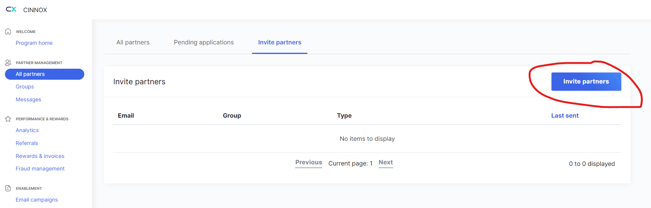
IT team shall send invitation to writer to register as a partner in PartnerStack plaform. (At PartnerStack admin portal, click "All Partners" -\> "Invite Partner" -\> "Invite individual partner".
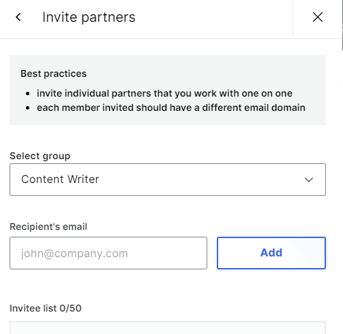
Then select "Content Writer"/"Virtual Sales" group, and input writer email.
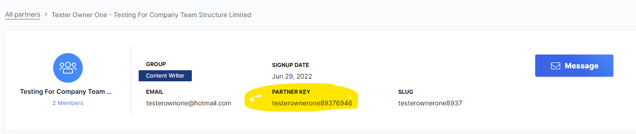
Marketing then can check writer PartnerStack Partner Key at "All Partners", by clicking on corresponing writer.
Invited partners will receive the invitation link from email.
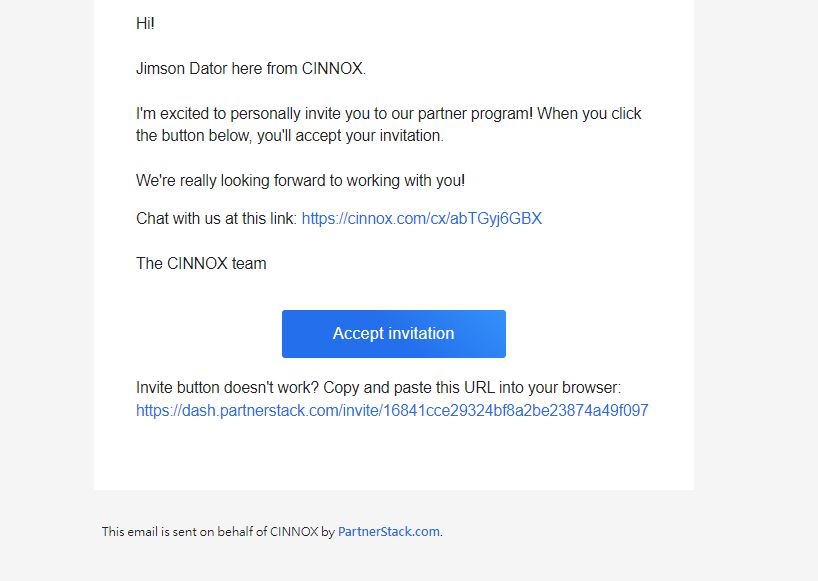
If the invited partner has a PartnerStack account already, a confirmation page will show.
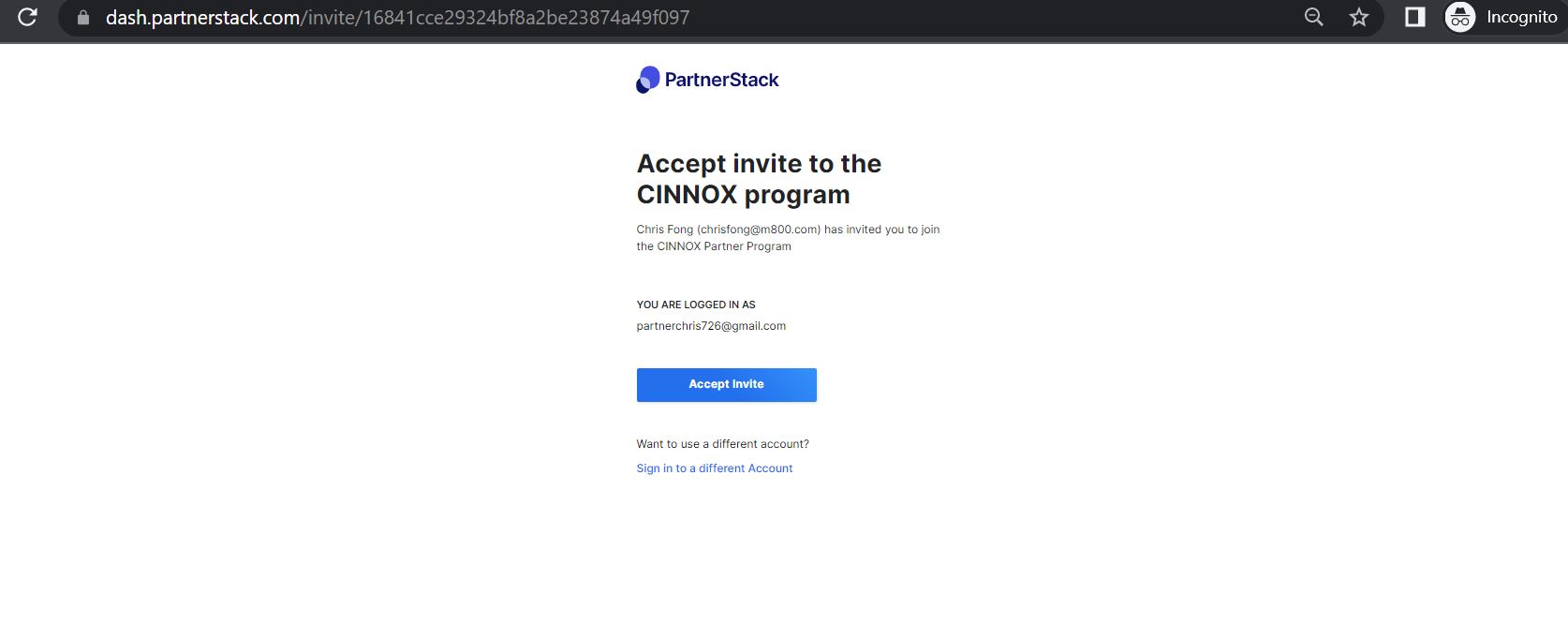
Writer/Virtual Sales can then follow the PartnerStack guideline to registered or create referral link.
PartnerStack Guideline: [https://hubs.ly/Q01gK\_qy0](https://hubs.ly/Q01gK_qy0)
**2. HubSpot Setup - Content Creator/Virtual Sales and PartnerStack Partner Key matching**
Marketing/IT shall edit following lead assignment and notification workflow when new writer/virtual sales join.
Online Lead assignment: [https://app.hubspot.com/workflows/20604920/platform/flow/174627237/edit](https://app.hubspot.com/workflows/20604920/platform/flow/174627237/edit)
14 days Free Trial assignment:
[https://app.hubspot.com/workflows/20604920/platform/flow/208332677/edit](https://app.hubspot.com/workflows/20604920/platform/flow/208332677/edit)
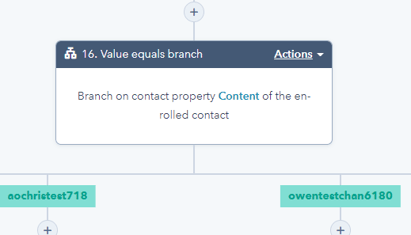
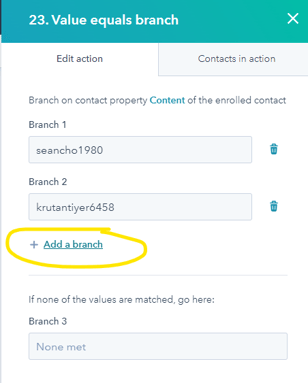
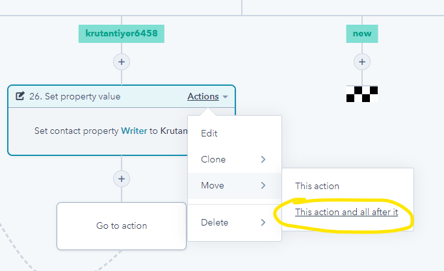
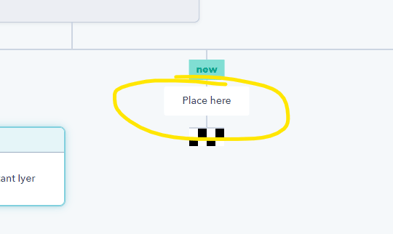
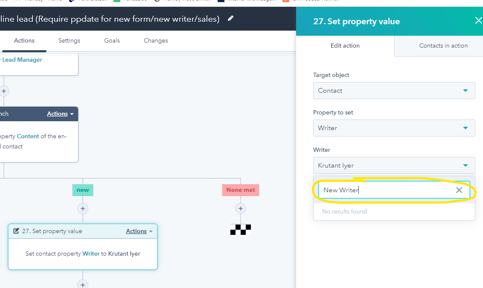
User should add additinoal branch in the corresponding value equals branch, and clone existing branch to new branch, then edit the contact property Writer to corresponding Writer.
### Content Tracking Setup:
For each content posted in https://blog.cinnox.com/, following UTM parameter should be registered to marketing and set in each tracking method:
UTM Campaign: Writer PartnerStack Partner Key
UTM Source: Platform
UTM Medium: Format
UTM Content: Aritcle ID
UTM Term: Keywords
Below are the three tracking method to regconize the writer attribution to CINNOX leads
**Tracking Method 1: Customized Embedded Form in Blog content (indirect)**
First, Marketing should create an form\* with unique default UTM value. e.g. [https://app.hubspot.com/forms/20604920/editor/26b5b151-6ad1-444e-97fd-254abee6cdfc/edit/form](https://app.hubspot.com/forms/20604920/editor/26b5b151-6ad1-444e-97fd-254abee6cdfc/edit/form)
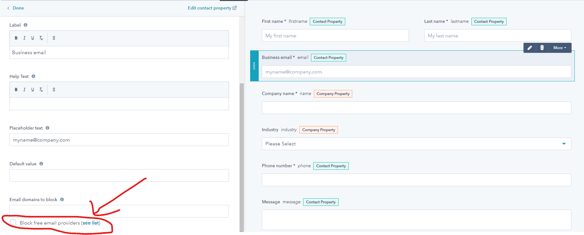
\* Writer / Market can choose to block free email provider by editing the email option.
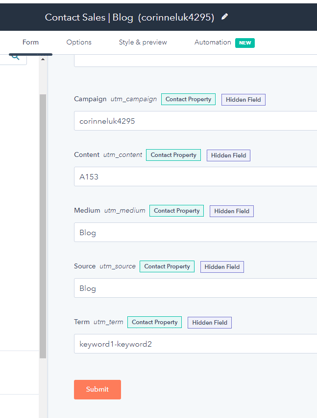
Second, enter the unique UTM parameter in the 5 hidden field.
Third, copy the embed code in edit form page.

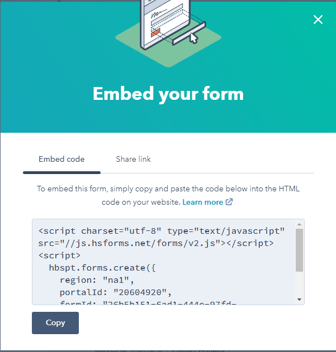
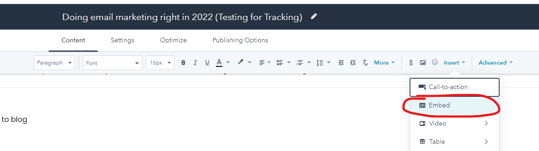
Then, insert in blog content by click "content"-\> "Insert"-\> "Embed".
Finally, paste the embed code of the form, and click "insert".
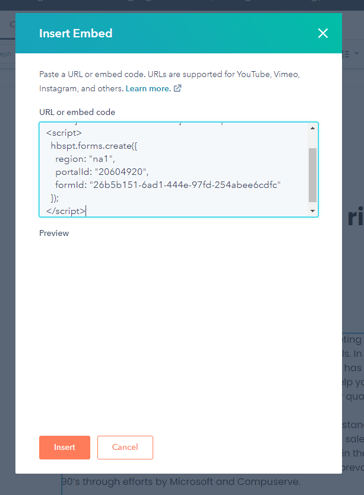
Form will be embbed to your blog content. Customer converted from this form will carry the form UTM value in contact properties.
**Tracking Method 2: Customized CTA button with UTM link (indirect)**
Writer / Marketing can create an customized CTA button.
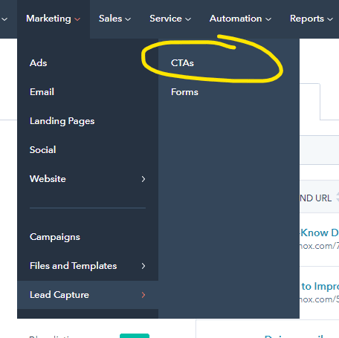
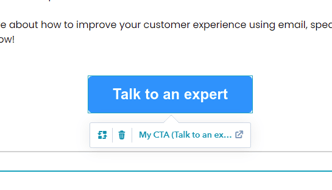
(CTA button in blog content)
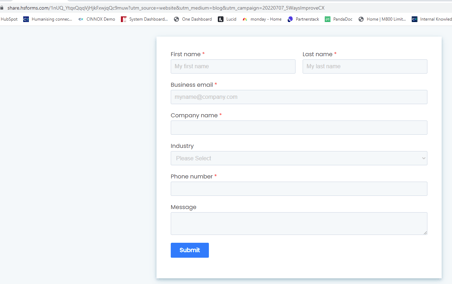
(CTA button url with UTM parameter)
Customer converted by click the CTA button and filling the form afterwards will carry the UTM value in contact properties.
**Tracking Method 3: HubSpot tracking URL with PartnerStack referral link (direct)**
Writer / Marketing can create a custom UTM link with a PartnerStack referral link for writer to share in 3rd party platform to draw diret traffic to CINNOX website.
First, writer shall create a custom links in PartnerStack platform, with a custome desination. Default link would be redirected to www.cinnox.com/pricing.html. Writer are free to change the destination to where they found the conversion rate is highest.
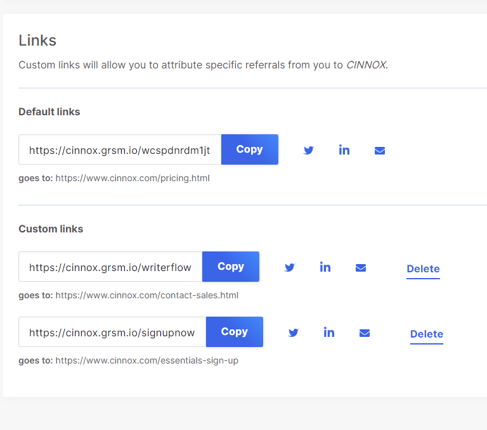
Then, marketing can set up a UTM tracking URL. Placing the PartnerStack referral link to "URL", then set up the remaining UTM value according to above pattern. Writer can then share the UTM tracking URL in 3rd party platform and then trace the click rate and conversion in online sign up in PartnerStack.
- [Enterprise Business](https://support.cinnox.com/migration/internalknowledgebase/enterprise-business#main-content)
- [Virtual Sales Team](https://support.cinnox.com/migration/internalknowledgebase/enterprise-business#virtual-sales-team)
- [International Business](https://support.cinnox.com/migration/internalknowledgebase/international-business#main-content)
- [Partner](https://support.cinnox.com/migration/internalknowledgebase/international-business#partner)
- [Human Resources](https://support.cinnox.com/migration/internalknowledgebase/human-resources#main-content)
- [HRM system](https://support.cinnox.com/migration/internalknowledgebase/human-resources#hrm-system)
- [IT & Security](https://support.cinnox.com/migration/internalknowledgebase/it-security)
- [Engineering & Operation](https://support.cinnox.com/migration/internalknowledgebase/engineering-operation#main-content)
- [Workflow](https://support.cinnox.com/migration/internalknowledgebase/engineering-operation#workflow)
- [Marketing](https://support.cinnox.com/migration/internalknowledgebase/marketing#main-content)
- [Overview](https://support.cinnox.com/migration/internalknowledgebase/marketing#overview)
- [Marketing Assets](https://support.cinnox.com/migration/internalknowledgebase/marketing#marketing-assets)
- [IOD](https://support.cinnox.com/migration/internalknowledgebase/iod#main-content)
- [Procurement](https://support.cinnox.com/migration/internalknowledgebase/iod#procurement)
- [Billing Operations](https://support.cinnox.com/migration/internalknowledgebase/iod#billing-operations)
- [Supplier](https://support.cinnox.com/migration/internalknowledgebase/iod#supplier)
- [Product](https://support.cinnox.com/migration/internalknowledgebase/product)
- [CINNOX Knowledge Base](https://support.cinnox.com/migration/internalknowledgebase/cinnox-knowledge-base#main-content)
- [1.0 Solutions](https://support.cinnox.com/migration/internalknowledgebase/cinnox-knowledge-base#1-0-solutions)
- [1.1 Applications](https://support.cinnox.com/migration/internalknowledgebase/cinnox-knowledge-base#1-1-applications)
- [1.2 Financial Services](https://support.cinnox.com/migration/internalknowledgebase/cinnox-knowledge-base#1-2-financial-services)
- [1.3 E-Commerce](https://support.cinnox.com/migration/internalknowledgebase/cinnox-knowledge-base#1-3-e-commerce)
- [1.4 Telecom](https://support.cinnox.com/migration/internalknowledgebase/cinnox-knowledge-base#1-4-telecom)
- [1.5 Marketing Assets](https://support.cinnox.com/migration/internalknowledgebase/cinnox-knowledge-base#1-5-marketing-assets)
- [1.6 Others](https://support.cinnox.com/migration/internalknowledgebase/cinnox-knowledge-base#1-6-others)
- [2.0 Subscriptions & Plans](https://support.cinnox.com/migration/internalknowledgebase/cinnox-knowledge-base#2-0-subscriptions-plans)
- [2.1 Digital Commerce](https://support.cinnox.com/migration/internalknowledgebase/cinnox-knowledge-base#2-1-digital-commerce)
- [2.2 Business Plan](https://support.cinnox.com/migration/internalknowledgebase/cinnox-knowledge-base#2-2-business-plan)
- [2.3 Enterprise Plan](https://support.cinnox.com/migration/internalknowledgebase/cinnox-knowledge-base#2-3-enterprise-plan)
- [2.4 Subscriptions, Fees & Payments](https://support.cinnox.com/migration/internalknowledgebase/cinnox-knowledge-base#2-4-subscriptions-fees-payments)
- [2.5 Partners and Plans](https://support.cinnox.com/migration/internalknowledgebase/cinnox-knowledge-base#2-5-partners-and-plans)
- [3.0 Capabilities & Features](https://support.cinnox.com/migration/internalknowledgebase/cinnox-knowledge-base#3-0-capabilities-features)
- [3.1 CHANNEL - Voice & Video](https://support.cinnox.com/migration/internalknowledgebase/cinnox-knowledge-base#3-1-channel-voice-video)
- [3.2 CHANNEL - Smart Messaging](https://support.cinnox.com/migration/internalknowledgebase/cinnox-knowledge-base#3-2-channel-smart-messaging)
- [3.3 CHANNEL - Virtual Number](https://support.cinnox.com/migration/internalknowledgebase/cinnox-knowledge-base#3-3-channel-virtual-number)
- [3.4 CHANNEL - Automated Chatbots](https://support.cinnox.com/migration/internalknowledgebase/cinnox-knowledge-base#3-4-channel-automated-chatbots)
- [3.5 CHANNEL - Smart Engagement](https://support.cinnox.com/migration/internalknowledgebase/cinnox-knowledge-base#3-5-channel-smart-engagement)
- [3.6 CHANNEL - Call Engagement](https://support.cinnox.com/migration/internalknowledgebase/cinnox-knowledge-base#3-6-channel-call-engagement)
- [3.7 ORCHESTRATE - Smart Routing and Rules](https://support.cinnox.com/migration/internalknowledgebase/cinnox-knowledge-base#3-7-orchestrate-smart-routing-and-rules)
- [3.8 ORCHESTRATE - Workflow Optimization](https://support.cinnox.com/migration/internalknowledgebase/cinnox-knowledge-base#3-8-orchestrate-workflow-optimization)
- [3.9 ORCHESTRATE - Identity](https://support.cinnox.com/migration/internalknowledgebase/cinnox-knowledge-base#3-9-orchestrate-identity)
- [3.10 EVALUATE - Dashboard & Analytics](https://support.cinnox.com/migration/internalknowledgebase/cinnox-knowledge-base#3-10-evaluate-dashboard-analytics)
- [3.11 EVALUATE - Integration & APIs](https://support.cinnox.com/migration/internalknowledgebase/cinnox-knowledge-base#3-11-evaluate-integration-apis)
- [3.12 EVALUATE - Security & Authentication](https://support.cinnox.com/migration/internalknowledgebase/cinnox-knowledge-base#3-12-evaluate-security-authentication)
- [4.0 Network Management & Operations](https://support.cinnox.com/migration/internalknowledgebase/cinnox-knowledge-base#4-0-network-management-operations)
- [4.1 Billing Support System (BSS)](https://support.cinnox.com/migration/internalknowledgebase/cinnox-knowledge-base#4-1-billing-support-system-bss)
- [4.2 Operation Support System (OSS)](https://support.cinnox.com/migration/internalknowledgebase/cinnox-knowledge-base#4-2-operation-support-system-oss)
- [4.3 Network Management System (NMS)](https://support.cinnox.com/migration/internalknowledgebase/cinnox-knowledge-base#4-3-network-management-system-nms)
- [4.4 Customer Management System](https://support.cinnox.com/migration/internalknowledgebase/cinnox-knowledge-base#4-4-customer-management-system)
- [5.0 Globally Distributed Core Infrastructure](https://support.cinnox.com/migration/internalknowledgebase/cinnox-knowledge-base#5-0-globally-distributed-core-infrastructure)
- [5.1 Carrier-Grade Infrastructure](https://support.cinnox.com/migration/internalknowledgebase/cinnox-knowledge-base#5-1-carrier-grade-infrastructure)
- [5.2 IP Network](https://support.cinnox.com/migration/internalknowledgebase/cinnox-knowledge-base#5-2-ip-network)
- [5.3 Private Cloud-based Communication](https://support.cinnox.com/migration/internalknowledgebase/cinnox-knowledge-base#5-3-private-cloud-based-communication)
- [5.4 Public Cloud-based Communication](https://support.cinnox.com/migration/internalknowledgebase/cinnox-knowledge-base#5-4-public-cloud-based-communication)
- [5.5 Dynamic Resources Allocator](https://support.cinnox.com/migration/internalknowledgebase/cinnox-knowledge-base#5-5-dynamic-resources-allocator)
- [5.6 Data Centres](https://support.cinnox.com/migration/internalknowledgebase/cinnox-knowledge-base#5-6-data-centres)
- [6.0 Services, Agreement & Policies](https://support.cinnox.com/migration/internalknowledgebase/cinnox-knowledge-base#6-0-services-agreement-policies)
- [6.1 Service Agreement](https://support.cinnox.com/migration/internalknowledgebase/cinnox-knowledge-base#6-1-service-agreement)
- [6.2 Privacy Policy](https://support.cinnox.com/migration/internalknowledgebase/cinnox-knowledge-base#6-2-privacy-policy)
- [6.3 Term of Use](https://support.cinnox.com/migration/internalknowledgebase/cinnox-knowledge-base#6-3-term-of-use)
- [6.4 Terms & Conditions of Services](https://support.cinnox.com/migration/internalknowledgebase/cinnox-knowledge-base#6-4-terms-conditions-of-services)
- [6.5 NDA](https://support.cinnox.com/migration/internalknowledgebase/cinnox-knowledge-base#6-5-nda)
- [6.6 Customer Services](https://support.cinnox.com/migration/internalknowledgebase/cinnox-knowledge-base#6-6-customer-services)
- [6.7 Resources Centre & FAQ](https://support.cinnox.com/migration/internalknowledgebase/cinnox-knowledge-base#6-7-resources-centre-faq)
- [7.0 Trends & Research](https://support.cinnox.com/migration/internalknowledgebase/cinnox-knowledge-base#7-0-trends-research)
- [7.1 Cloud Application and Trends](https://support.cinnox.com/migration/internalknowledgebase/cinnox-knowledge-base#7-1-cloud-application-and-trends)
- [7.2 Cybersecurity Threats](https://support.cinnox.com/migration/internalknowledgebase/cinnox-knowledge-base#7-2-cybersecurity-threats)
- [7.3 Digital Transformation and Trends](https://support.cinnox.com/migration/internalknowledgebase/cinnox-knowledge-base#7-3-digital-transformation-and-trends)
- [7.4 Hybrid Work and Social Media Convergence](https://support.cinnox.com/migration/internalknowledgebase/cinnox-knowledge-base#7-4-hybrid-work-and-social-media-convergence)
- [7.5 Intelligent Services and Big Data](https://support.cinnox.com/migration/internalknowledgebase/cinnox-knowledge-base#7-5-intelligent-services-and-big-data)
- [7.6 Total Experience (CX and EX)](https://support.cinnox.com/migration/internalknowledgebase/cinnox-knowledge-base#7-6-total-experience-cx-and-ex)
- [7.7 Quora Findings](https://support.cinnox.com/migration/internalknowledgebase/cinnox-knowledge-base#7-7-quora-findings)
- [7.8 Gartner and Forrester Findings](https://support.cinnox.com/migration/internalknowledgebase/cinnox-knowledge-base#7-8-gartner-and-forrester-findings)
- [8.0 Training Material (Product Development)](https://support.cinnox.com/migration/internalknowledgebase/cinnox-knowledge-base#8-0-training-material-product-development)
- [Legal](https://support.cinnox.com/migration/internalknowledgebase/legal)
# CINNOX
[mailto:email@email.com](mailto:email@email.com)
Copyright © 2026, CINNOX